
Server Guide & Rules
A combined guide to ZEV Server's main systems and the rules all players are expected to follow.
Table of Contents
1. Server Overview
ZEV Server is not just a simple survival server. It is a long-term custom server that combines an economy, equipment enhancement, Beefalo enhancement, stock trading, Defense content, and multi-world progression.
New players can grow gradually through the shop, coins, equipment upgrades, MYHOME, and the world travel system.
The server is designed as an Asia-region community where Korean, Vietnamese, English-speaking, and other players can play together. Please respect each other and enjoy the server.

2. World System
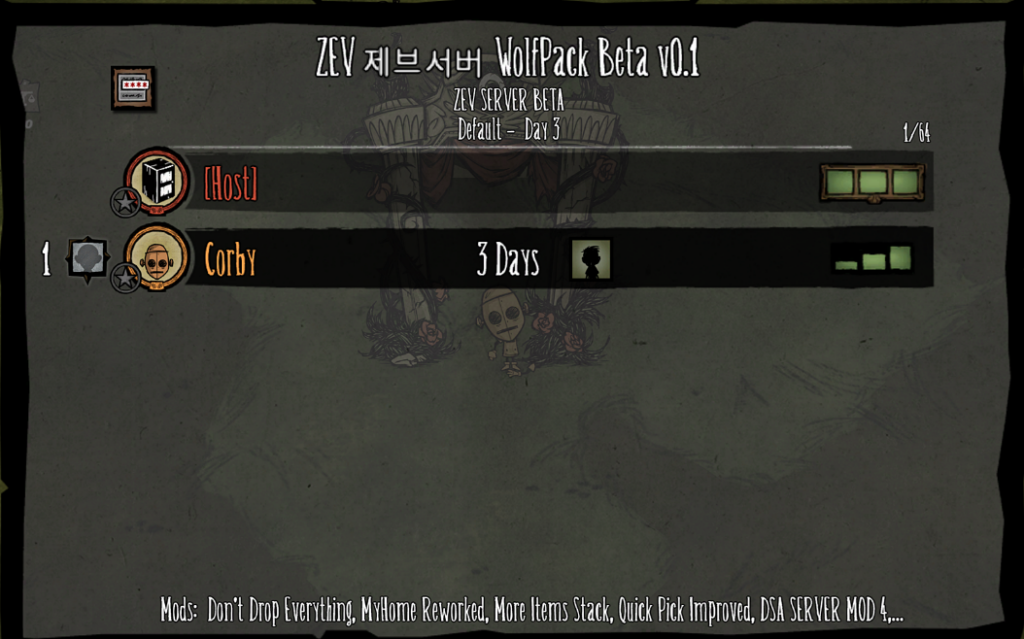
ZEV Server runs on a 48-shard structure. On first login, players enter World 1 Lobby.
Special-purpose worlds
- World 1 — Lobby: waiting, preparation, rest, and world travel.
- World 2 — Defense: a combat-only world for wave-based content.
- World 3 — PVP: currently not open and operated as a special world.
The Lobby usually allows up to 50 players, normal living worlds around 15, and Defense/PVP around 20. Actual limits may change depending on server conditions.
Normal living worlds and difficulty multipliers
The multiplier is the base reference for monster health, attack power, and drop rate.
| World group | Multiplier | FOREST | CAVE |
|---|---|---|---|
| World 11~15 | 1x | 11, 12, 13 | 14, 15 |
| World 21~25 | 1.25x | 21, 22, 23 | 24, 25 |
| World 31~35 | 1.5x | 31, 32, 33 | 34, 35 |
| World 41~45 | 1.75x | 41, 42, 43 | 44, 45 |
| World 51~55 | 2x | 51, 52, 53 | 54, 55 |
| World 61~65 | 2.25x | 61, 62, 63 | 64, 65 |
| World 71~75 | 2.5x | 71, 72, 73 | 74, 75 |
| World 81~85 | 2.75x | 81, 82, 83 | 84, 85 |
| World 91~95 | 3x | 91, 92, 93 | 94, 95 |
Forest and Cave connections
- Forest worlds 1 and 2 connect to Cave worlds 4 and 5.
- Example: World 11 ↔ 14 and World 12 ↔ 15.
- Worlds 13, 23, 33, 43, 53, 63, 73, 83, and 93 are surface-only worlds without caves.
- Travel is based on the ZEV portal UI. Direct cave entrance or sinkhole travel may be restricted.
Character changes should be performed in World 1 Lobby using Moon Rock Idol or the related function. Organize important items before changing characters.
3. How to Travel Between Worlds
Right-click a portal to open the ZEV world travel UI.
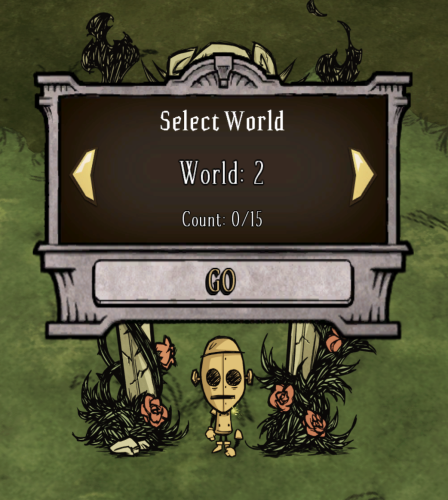
- Left-click an arrow to move by one world.
- Right-click an arrow to move by five worlds.
- The UI may show current players and the maximum allowed players.
- Travel may be restricted if a world is full or the required conditions are not met.
- Building or blocking paths around portals may be restricted.
4. Defense World Guide
Defense World is ZEV Server's cooperative combat content. Players defend a fixed area from waves of monsters.
How to enter and start
- Select Defense or World 2 in the world travel UI.
- After preparation, start Defense through a vote.
- Prepare armor, weapons, healing food, sanity recovery, and repair materials.
- ZEV Defense can progress up to wave 500.
Defense UI
- Defense Wave: current wave.
- Next Wave: remaining time until the next wave.
- Alive Mobs: number of monsters still alive.
- VOTE: vote status for Defense actions.
Approximate monster scaling
| Wave range | 1 player | 2 players | 3 players | 4+ players |
|---|---|---|---|---|
| 1~50 | about 1.0~1.8x | about 1.3~2.3x | about 1.6~2.9x | about 2.0~3.6x |
| 51~100 | about 2~3x | about 2.6~4x | about 3.2~5x | about 4~6x |
| 101~150 | about 3.5~5x | about 4.5~6.5x | about 5.5~8x | about 7~10x |
| 151~300 | about 5~9x | about 6.5~12x | about 8~15x | about 10~18x |
| 301~500 | about 10~18x+ | about 13~24x+ | about 16~30x+ | about 20~36x+ |
Actual difficulty depends on monster types, bosses, enhanced gear, Buff Food, and teamwork.
Rewards and failure handling
- Rewards are calculated every 10 waves.
- Example: wave 10 gives 1 token, wave 20 gives 2, and wave 30 gives 3.
- The actual amount depends on waves participated in and contribution.
- After a failure, players may have about 180 seconds to recover dropped items.
- Bags dropped in Defense World are protected by owner.
5. MYHOME System
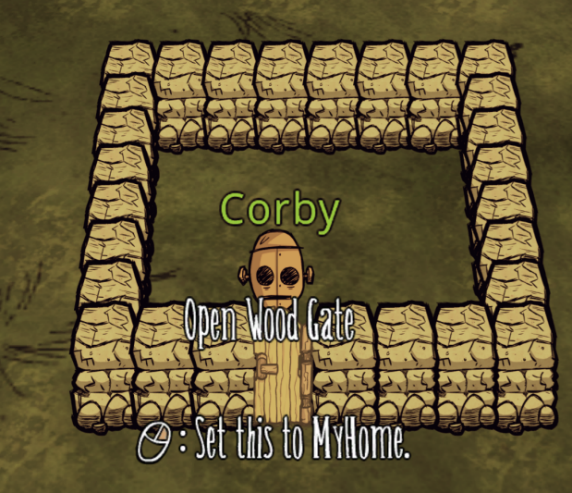
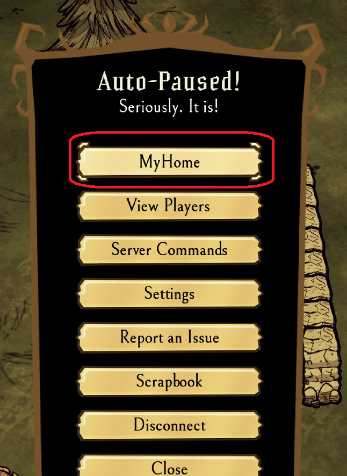
MYHOME is a private-area protection system. Build walls around an area and install a door to create a protected space.
Requirements and features
- Minimum 16 wall blocks and maximum 300.
- Creation may be restricted if too close to another MYHOME.
- Invite friends, allow entry, and share use of the space.
- Store important items in chests, ice boxes, backpacks, or other containers.
Long-inactive MYHOME
If the owner does not log in for about 21 days, MYHOME may change to UNLOCKED. Organize valuables before a long absence.
6. World Reset and Reset Tokens
Normal living worlds use a monthly reset policy, with reset judgment performed on the first day of every month.
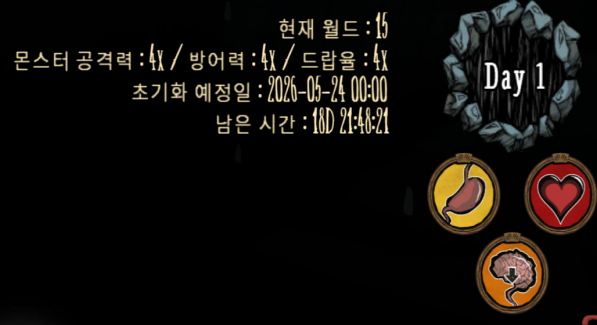
WORLD RESET TOKEN
- The target is 300 / 300.
- At DONE, that world is protected from its individual monthly reset.
- It applies only to that specific normal living world.
- Lobby, Defense, and PVP are not normal WORLD RESET TOKEN targets.
SERVER RESET TOKEN
- It is the total of WORLD RESET TOKEN counts reported by normal living worlds.
- The target is 1000 / 1000.
- It is not a separate item used directly.
- Reaching DONE prevents a full server reset, but does not automatically protect every individual world.
Monthly reset schedule
- Around 01:00 on the first day: SERVER RESET TOKEN is checked.
- If the total is below 1000, a full server reset may occur.
- If the total reaches 1000/1000 DONE, the full reset is prevented.
- From about 01:10 to 01:30, normal living worlds are checked individually.
- Worlds below 300/300 may be regenerated individually.
- Coins and stock data are stored separately from world reset.
Surface Lunar Rift
When a world reaches 300/300 DONE, its Surface Lunar Rift may close or stop spawning for the rest of the monthly period. At the next monthly period, after the morning restart, Rift content can become available again.
7. Beefalo System
Once a Beefalo reaches 100% domestication, its domestication value will not decrease again. Beefalo below 100% still requires normal management.
Beefalo Bell
- Summon or store a 100% domesticated Beefalo.
- Stored Beefalo keep their enhancement level and current health.
- Storage is recommended before world travel, character changes, or when not in use.
Beefalo enhancement
- Feed 100 allowed crop materials to a 100% domesticated adult Beefalo.
- Maximum enhancement is +20.
- Possible results are success, no change, -1, -2, and RESET.
- RESET does not delete the Beefalo; it returns enhancement to +0.
Allowed crops: Asparagus, Corn, Dragon Fruit, Durian, Eggplant, Garlic, Onion, Pepper, Pomegranate, Potato, Pumpkin, Toma Root, and Watermelon.
Carrot, Banana, and Stone Fruit are not enhancement materials.
| Enhancement | Max health | Damage reduction |
|---|---|---|
| +0 | 1,000 | 0% |
| +1 | 2,400 | 7% |
| +2 | 3,800 | 14% |
| +3 | 5,200 | 21% |
| +4 | 6,600 | 28% |
| +5 | 8,000 | 35% |
| +6 | 9,400 | 42% |
| +7 | 10,800 | 49% |
| +8 | 12,200 | 56% |
| +9 | 13,600 | 63% |
| +10 | 15,000 | 70% |
| +11 | 17,500 | 71% |
| +12 | 20,000 | 72% |
| +13 | 22,500 | 73% |
| +14 | 25,000 | 74% |
| +15 | 27,500 | 75% |
| +16 | 30,000 | 76% |
| +17 | 32,500 | 77% |
| +18 | 35,000 | 78% |
| +19 | 37,500 | 79% |
| +20 | 40,000 | 80% |
Normal feeding
- A 1-item stack feeds 1 item.
- Stacks of 2~10 are eaten all at once.
- Stacks of 11 or more feed only 10 at once.
- Allowed enhancement crops with 100 or more items prioritize enhancement.
Lobby automatic recovery for Beefalo is restricted. Salt Licks are adjusted so they do not lose durability.
8. Shop System
The shop is a core part of the ZEV economy.
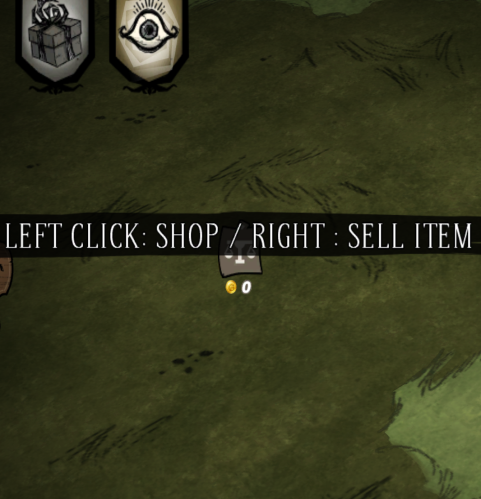
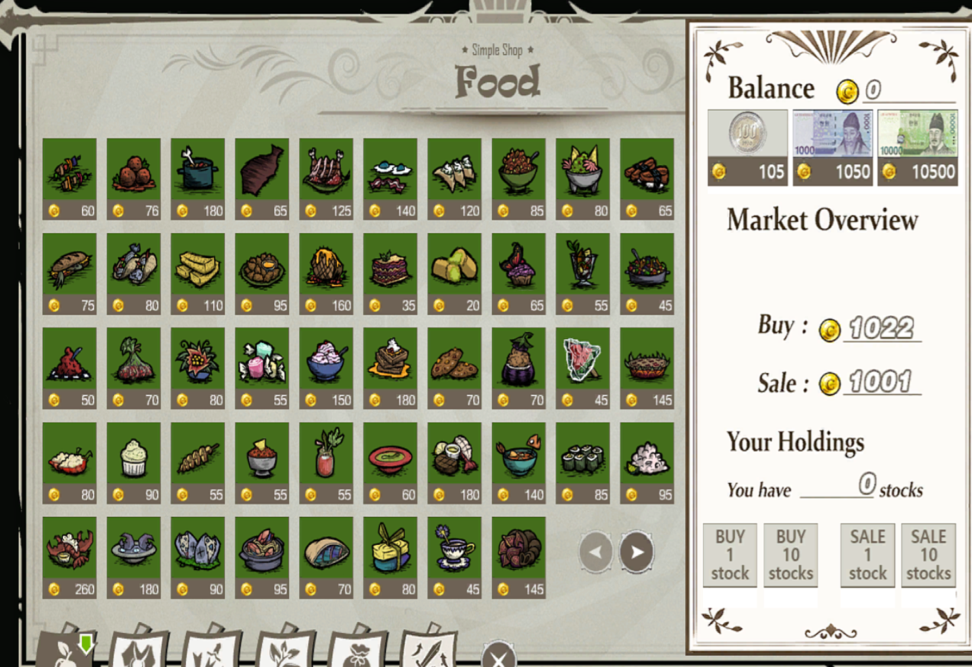
Purchase controls
- Left-click: buy 1.
- Right-click: buy 10.
- Shift + left-click: buy 100.
- Shift + right-click: buy 1,000.
Bulk purchase applies to normal shop items. Inventory space and available coins may limit the delivered amount.
Price system
- Frequent purchases increase prices.
- Frequent sales decrease prices.
- Prices are synchronized across all worlds in real time.
- Actual payments use the server price table.
| Item | Buy | Sell |
|---|---|---|
| DSA100 | 105 | 100 |
| DSA1000 | 1,050 | 1,000 |
| DSA10000 | 10,500 | 10,000 |
| Defense Token | 6,500 | 2,000 |
9. Currency System
- Earn coins by selling items.
- Coins are bound to the character.
- Coins can be converted into cash items.
- Cash items can be traded to other players.
- Using a cash item converts it back into coins.
- Coins are stored separately from world reset.
10. Stock System
ZEV stock prices are linked to the server economy.
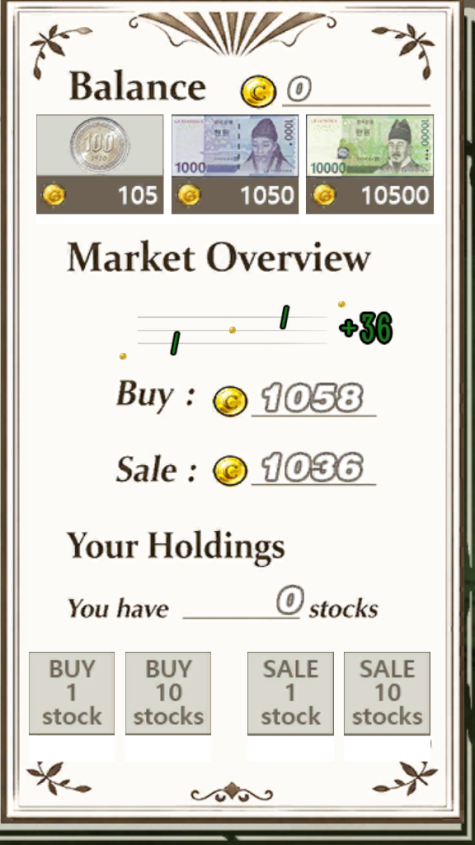
- More shop purchases increase the chance of prices rising.
- More shop sales increase the chance of prices falling.
- Player trades are reflected in real time.
- Prices may change when an in-game day passes.
- Stocks are character-bound like coins.
11. Equipment Enhancement
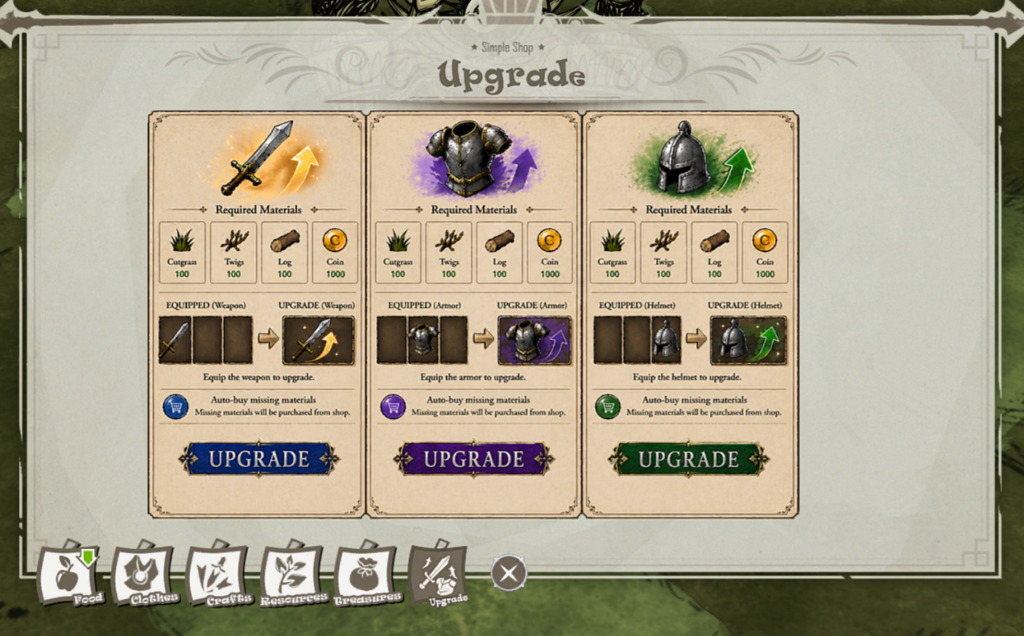
Use the upgrade button on equipped gear to enhance it up to +20.
Required materials
- Grass × 100.
- Twigs × 100.
- Logs × 100.
- 1,000 coins.
Missing materials may be automatically purchased from the shop. Enhancement will not proceed if there are not enough coins.
Enhancement effects
- Weapons gain about +3 attack power per level.
- Armor gains about +3 percentage points of damage reduction per level, up to about 95%.
- Durability-based gear may gain about +10% base durability per level.
- Usage-count equipment may be refreshed based on enhancement level × 1,000 uses.
12. ZEV Buff Food
ZEV Buff Food is special server-only food purchased through the shop.
- All characters can eat it.
- One item lasts 5 minutes.
- Duration can stack up to 30 minutes.
- For the same buff type, the stronger effect takes priority.
| Type | Effect | ZEV Food |
|---|---|---|
| MOV | Movement speed | +8% Jammy Preserves / +12% Watermelonicle / +15% Dragonpie |
| ACT | Action speed | +8% Taffy / +12% Potato Tornado / +15% Salsa Fresca |
| DMG | Damage | +8% Vegetable Stinger / +12% Spicy Chili / +15% Stuffed Pepper Poppers |
| DUR | Durability consumption reduction | -10% Ratatouille / -20% Stuffed Eggplant / -30% Creamy Potato Puree |
13. Farming Support
Farming is a relatively safe way for new players to earn coins.
- Fully grown normal crop: 15% chance to receive 1 DSA100.
- Giant crop: 50% chance to receive 1 DSA100.
- Rotten crops and weeds do not qualify.
- Reward checks apply only once per crop.
- Rewards are not guaranteed on every harvest.
14. Server Convenience Features
- Most normal items use a 100-stack rule.
- Quick Pick makes some gathering actions faster.
- Abnormally accumulated monsters, nests, and ground items may be cleaned up.
- Grass Gekko conversion may be restricted.
- Items with important individual state, such as traps, may be excluded from auto-stacking.
- Show Me may display health, hunger, defense, and durability.
- Chest, bundle, gift, and MYHOME-protected information may be hidden.
- Use Crack All in inventory for Stone Fruit.
- Portal blocking, global fire spread, and excessive object generation may be restricted.
15. Death and Item Protection
Most items do not drop on the ground on normal death.
The following items may still drop because of resurrection-related behavior:
- Life Giving Amulet.
- Wanda's Second Chance Watch.
Check the area after death.
16. Item Cleanup Policy
ZEV Server automatically cleans up items left on the ground for too long or excessively placed in one area.
Regular cleanup
- Runs at 00 and 30 minutes of every real-world hour.
- A warning may appear about 2 minutes before cleanup.
- Cleanup is processed in batches, so a short delay may occur.
Ground stack rules
- Stacks of 1~5 are protected.
- Stacks of 6 or more may be cleaned after 3 consecutive detections.
- With a 30-minute cycle, this is about 90 minutes.
- Non-stackable cleanup targets may also be removed after repeated detection.
Mass placement and emergency cleanup
- More than 20 objects of the same type may be reduced to 20 after repeated detection.
- At 100 or more objects, auto-stacking may run and only 90 may remain.
- The rule counts ground objects, not item quantities inside containers.
MYHOME, Lobby, and ocean
- Items dropped directly on the ground inside MYHOME are still ground items.
- Lobby cleanup may cover a wider area.
- Ocean cleanup may check abandoned items about every 10 minutes.
- Sunken boats and isolated ocean structures may be cleaned together.
17. Trash Can System
- The trash can deletes unwanted items.
- Items inside are deleted after about 60 seconds.
- The trash can itself remains.
- Deleted items may be difficult to restore.
18. Reset Protection and Defense Tokens
Reset protection is a shared objective for players using the same world.
How to use Defense Tokens
- Move to the normal living world you want to protect.
- Right-click a Defense Token or use Apply To World.
- Each token increases that world's WORLD RESET TOKEN by 1.
- Additional use may be restricted after 300/300 DONE.
How to obtain them
- Receive them from Defense rewards every 10 waves.
- Buy price: 6,500 coins.
- Sell price: 2,000 coins.
- Top Contributors may receive selected travel convenience benefits.
19. Enhancement Rates
For equipment, the final column means destruction. For Beefalo, the final column means RESET to +0, not deletion.
| Attempt | Success | No change | -1 | -2 | Destroy / RESET |
|---|---|---|---|---|---|
| +0 → +1 | 100% | 0% | 0% | 0% | 0% |
| +1 → +2 | 95% | 5% | 0% | 0% | 0% |
| +2 → +3 | 90% | 10% | 0% | 0% | 0% |
| +3 → +4 | 85% | 10% | 5% | 0% | 0% |
| +4 → +5 | 75% | 10% | 10% | 3% | 2% |
| +5 → +6 | 65% | 12% | 13% | 5% | 5% |
| +6 → +7 | 55% | 15% | 15% | 8% | 7% |
| +7 → +8 | 45% | 15% | 18% | 10% | 12% |
| +8 → +9 | 35% | 15% | 20% | 12% | 18% |
| +9 → +10 | 25% | 15% | 20% | 15% | 25% |
| +10 → +11 | 22% | 14% | 20% | 16% | 28% |
| +11 → +12 | 20% | 13% | 20% | 17% | 30% |
| +12 → +13 | 18% | 12% | 20% | 18% | 32% |
| +13 → +14 | 16% | 12% | 20% | 18% | 34% |
| +14 → +15 | 14% | 11% | 20% | 19% | 36% |
| +15 → +16 | 12% | 11% | 20% | 19% | 38% |
| +16 → +17 | 10% | 10% | 20% | 20% | 40% |
| +17 → +18 | 8% | 10% | 20% | 20% | 42% |
| +18 → +19 | 6% | 9% | 20% | 20% | 45% |
| +19 → +20 | 4% | 8% | 20% | 20% | 48% |
+20 is the maximum enhancement level. Rates may change with balance adjustments.
20. Basic Etiquette
- Please respect all players.
- Excessive swearing, insults, and intentional argument-provoking are prohibited.
- Political, hateful, sexual, or offensive remarks may result in punishment.
- Spam and repeated attention-seeking behavior are not allowed.
- Do not intentionally disrupt another player's gameplay experience.
21. No Griefing or Trolling
Any behavior that ruins another player's experience is strictly prohibited.
- Burning or destroying another player's base.
- Stealing items from chests or ice boxes.
- Removing important structures.
- Luring monsters into another player's base.
- Trap abuse or intentional teamkilling.
- World destruction or malicious trolling.
Severe malicious behavior may result in an immediate kick or ban without warning.
22. New Player Protection
- Scamming or stealing from new players is prohibited.
- Do not intentionally lure new players into dangerous areas.
- Excessive backseating or forcing playstyles is discouraged.
- Mocking players for asking questions is prohibited.
23. Server Stability Rules
- Spamming meaningless structures is prohibited.
- Abusing abnormal objects or mechanics is prohibited.
- Intentional world destruction is prohibited.
- Excessive item dumping is prohibited.
- Exploiting bugs or glitches is prohibited.
Staff may remove certain structures when necessary for performance and stability.
24. No Cheats, Hacks, or Exploits
- Hacks, cheats, and macros are prohibited.
- Exploiting bugs is prohibited.
- Modifying the client for unfair advantages is prohibited.
Violations may result in a permanent ban.
25. Base and Resource Rules
- Do not build too close to another player's base without permission.
- Do not damage shared or public areas.
- Structures from long-inactive players may be cleaned up.
- Hoarding rare resources is prohibited.
The world is a shared space for everyone.
26. Staff and Administration
- Staff decisions prioritize server stability and fairness.
- Rules may change depending on server conditions.
- Screenshots or evidence are strongly encouraged when reporting issues.
- False reports or intentionally causing disputes may also result in punishment.
27. Server Culture
- A respectful community.
- A free and comfortable gameplay environment.
- A welcoming place for new players.
- The immersive atmosphere unique to Don't Starve Together.
- Stable long-term server management.
28. Final Note
These rules exist so everyone can enjoy the game together.
As long as you show basic respect and consideration for others, everyone is welcome here.
“Even in a dark world, a good atmosphere can survive for a long time.”
Enjoy your survival.
댓글 0
| 번호 | 제목 | 글쓴이 | 날짜 | 조회 수 |
|---|---|---|---|---|
| » | Server Guide & Rules | Corby | 2026.07.19 | 1458 |
| 공지 | Hướng dẫn và Quy tắc Server | Corby | 2026.07.19 | 1377 |
| 공지 | 서버 가이드 및 이용 규칙 | Corby | 2026.07.19 | 1511 |