

🐺 ZEV SERVER (WolfPack Beta 0.1)
📌 Discord
https://discord.com/invite/MHKHKUP
🎮 Server Introduction
ZEV is not just a simple survival server.
👉 a custom server combining Economy + Upgrade + Multiworld systemsis.
Everyone can enjoy the server comfortably without pressure.
The server is also managed together with one Vietnamese administrator,
and Vietnamese players are expected to join soon,
creating a more active server environment.
Please respect each other and enjoy the game 😊
🖼️ Server Login Screen
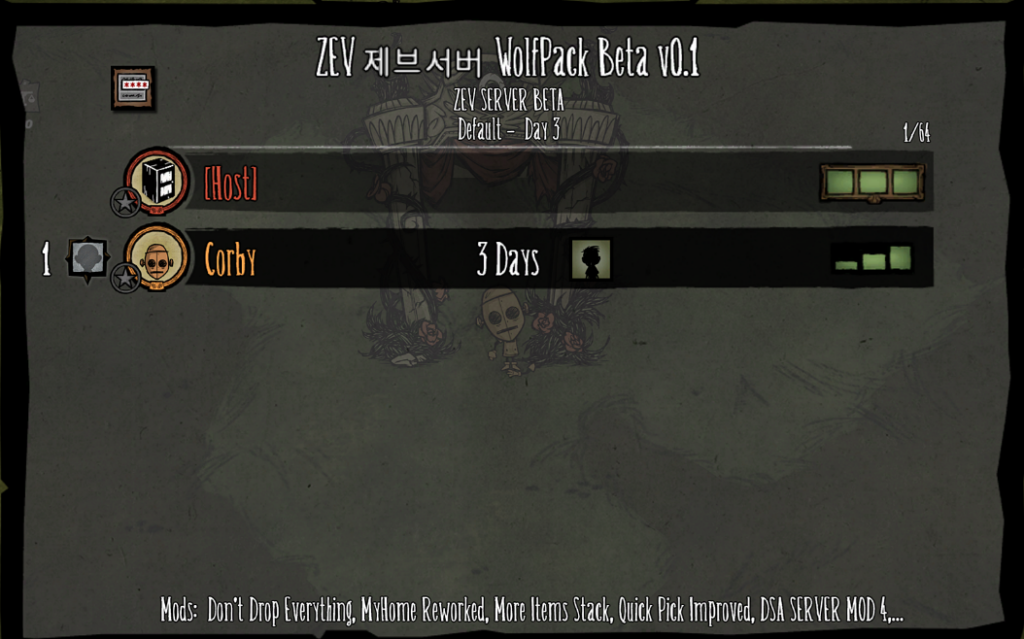
👉 Actual server login screen
※ Search for “zev” in the server filter to find it.
🌍World System (32 Worlds Total)
ZEV Server consists of 32 worlds in total.
👉 When you first join, you will enter World 1 (LOBBY)
🏠 World 1 (LOBBY)
All actions are disabled.
Characters are invincible.
👉 Used as a lobby for waiting and world transfer only.
If the game gets difficult, you can move to the lobby world and rest safely.
In the lobby world, all stats such as health and hunger recover to 100%.
🖼️ World Transfer UI
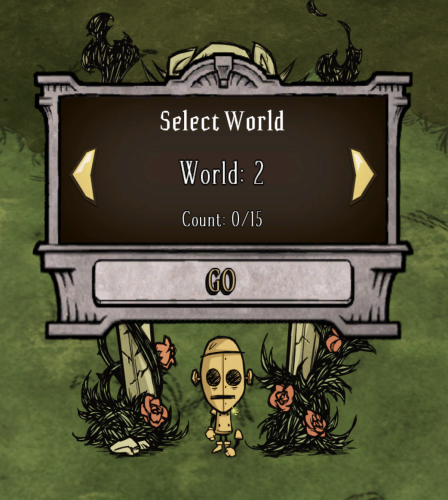
👉 Right-click the portal to select a world.
🌱 Normal Difficulty (1x)
(Normal monsters / Normal drop rate)
- Worlds 11, 12, 13: FOREST
- Worlds 14, 15: CAVE
⚔️ x2 Difficulty
(Monster ATK/DEF x2 / Item Drops x2)
- Worlds 21, 22, 23: FOREST
- Worlds 24, 25: CAVE
🔥 x3 Difficulty
(Monster ATK/DEF x3 / Item Drops x3)
- Worlds 31, 32, 33: FOREST
- Worlds 34, 35: CAVE
☠️ x4 Difficulty
(Monster ATK/DEF x4 / Item Drops x4)
- Worlds 41, 42, 43: FOREST
- Worlds 44, 45: CAVE
👹 x5 Difficulty
(Monster ATK/DEF x5 / Item Drops x5)
- Worlds 51, 52, 53: FOREST
- Worlds 54, 55: CAVE
💀 x6 Difficulty
(Monster ATK/DEF x6 / Item Drops x6)
- Worlds 61, 62, 63: FOREST
- Worlds 64, 65: CAVE
🌀 Change Character
👉 Change your character at the portal in World 1 (Lobby World) using the Moon Rock Idol.
🏠 MYHOME System
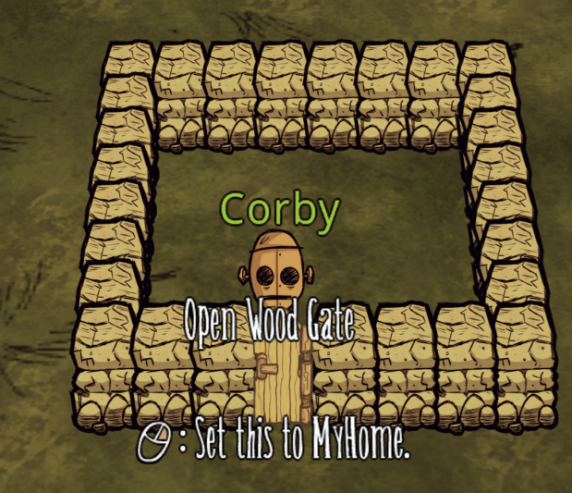
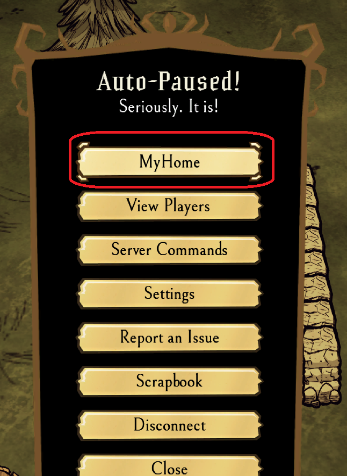
🏡 Personal Home System
Through the MYHOME mod,
👉 players can create their own private space.
🔨 Setup Method
Surround an area with brick walls,
place a door, then right-click to set up MYHOME.
※ In some cases, you may need to select the area manually.
📏 Requirements
Minimum: 16 blocks
Maximum: 300 blocks
👉 A certain area size is required to set it up.
👥 Friend Management
In MYHOME settings,
👉 you can add and manage friends.
Invite friends
Allow access
Shared use available
💡 Features
Restrict access from outside players
Use it as a private storage/base
Secure a safe living area
👉 Not just survival,
you can also manage your own home.
🖼️ In-game Information UI
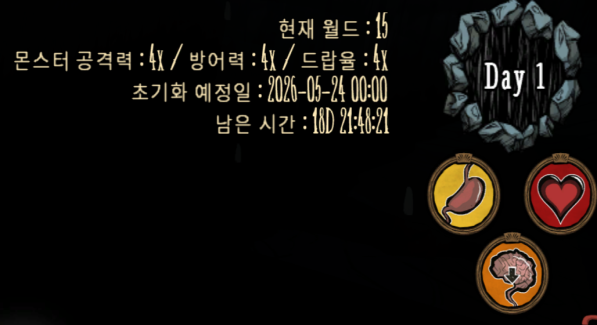
👉 Current world and information are displayed at the top-right.
💰 Shop System
🖼️ Shop UI
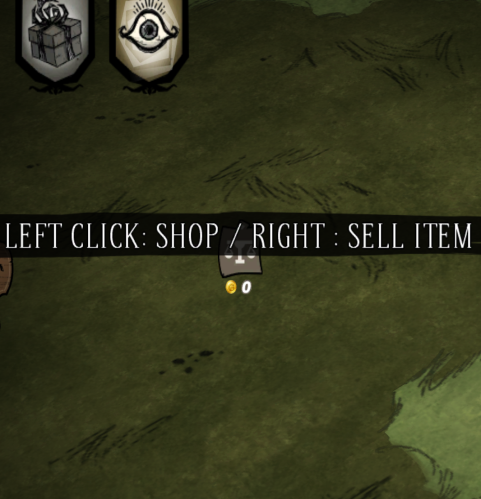
👉 Top-left icon
Left click: Buy
Right click: Sell
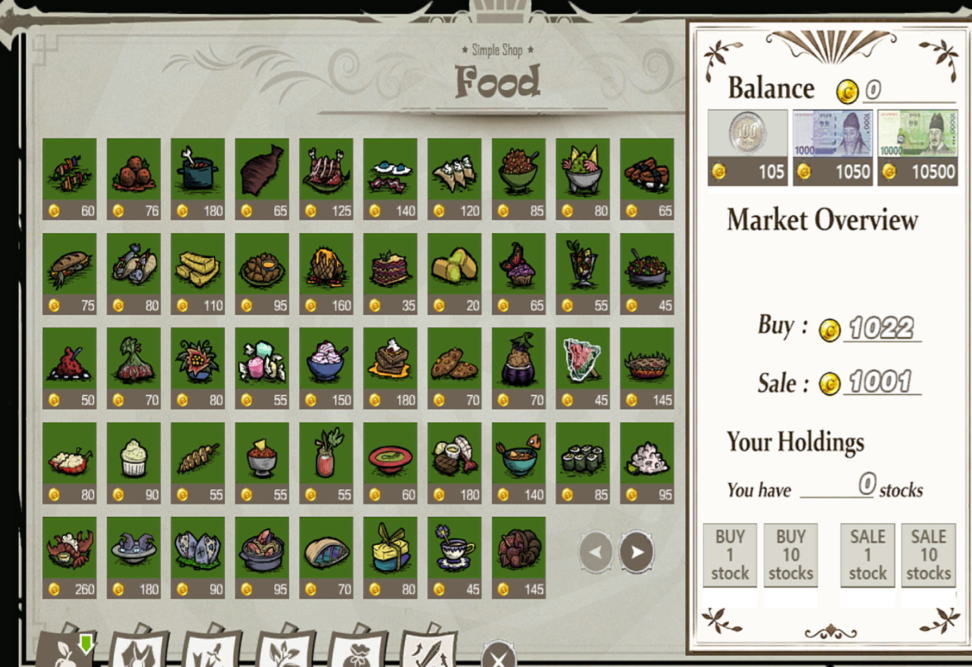
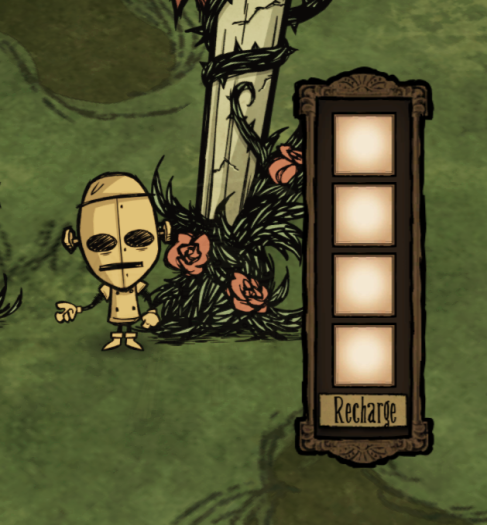
📦 Selling Method
👉 Right-click the top-left icon to open the selling window.
👉 Put items in, then click RECHARGE to complete the sale.
📊 Price System (Important)
Buying -> Price increases
Selling -> Price decreases
👉 Prices change based on supply and demand.
Prices are linked in real time across all worlds (1-16).
Other player transactions are also reflected in real time.
💵 Currency System
Sell items -> Earn coins
Coins -> Can be converted into cash items
Cash items are placed in your inventory.
Can be transferred to other players.
👉 Coins are bound to the character.
🔧 Equipment Upgrade System
🖼️ Upgrade UI
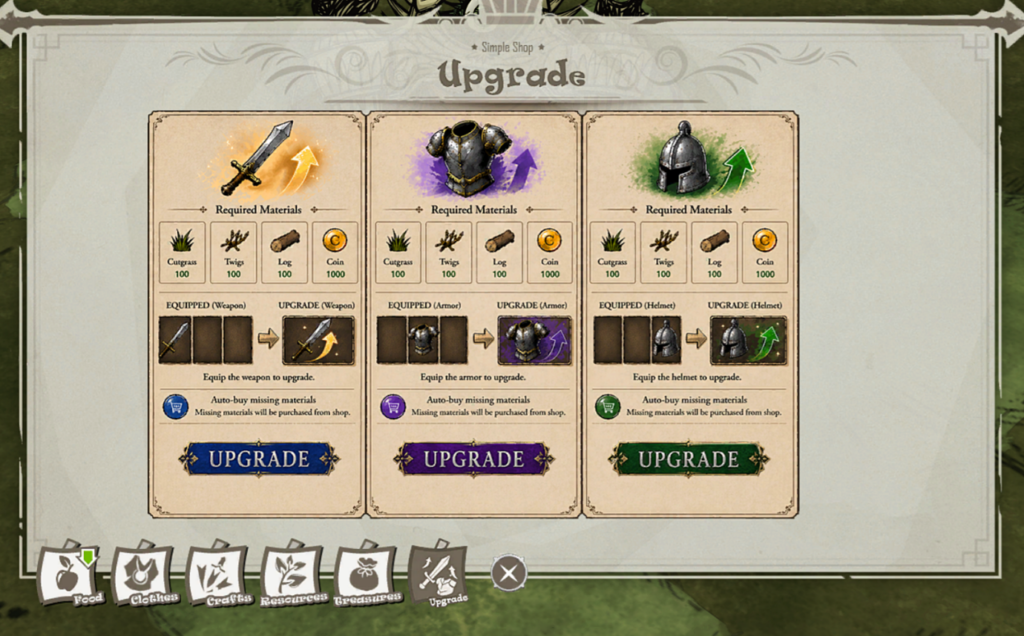
👉 Upgrade equipped gear using the upgrade button.
Upgrade Materials
Grass x100
Twigs x100
Wood x100
1,000 Coins
🔥 Key Feature (Important)
👉 When clicking upgrade with missing materials,
👉 the missing materials are automatically purchased from the shop.
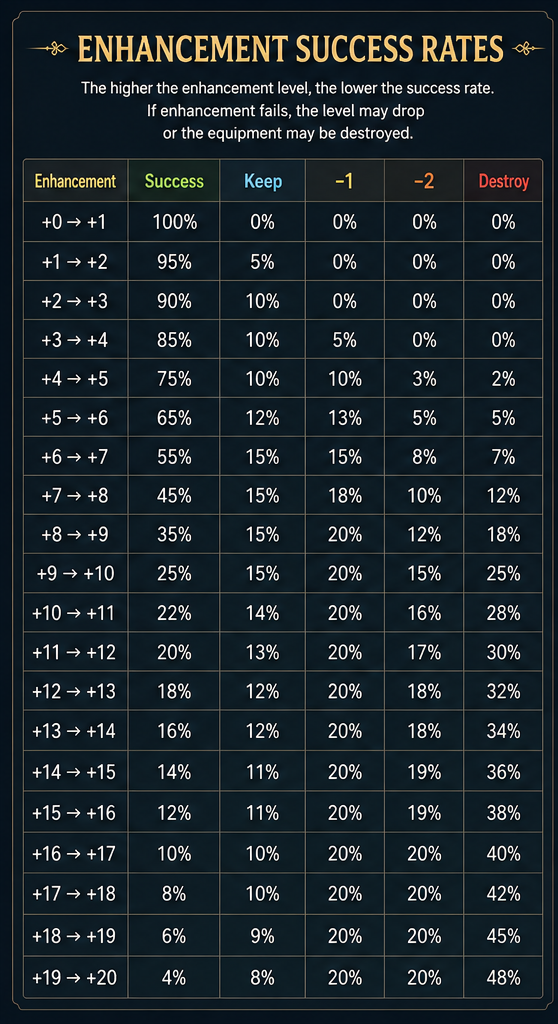
Upgrade Features
Maximum +20
Low success rate (challenge-based system)
+1,000 durability per upgrade level
Weapons: ATK
Armor: DEF
Increase
📈 Stock Market System
🖼️ Stock UI
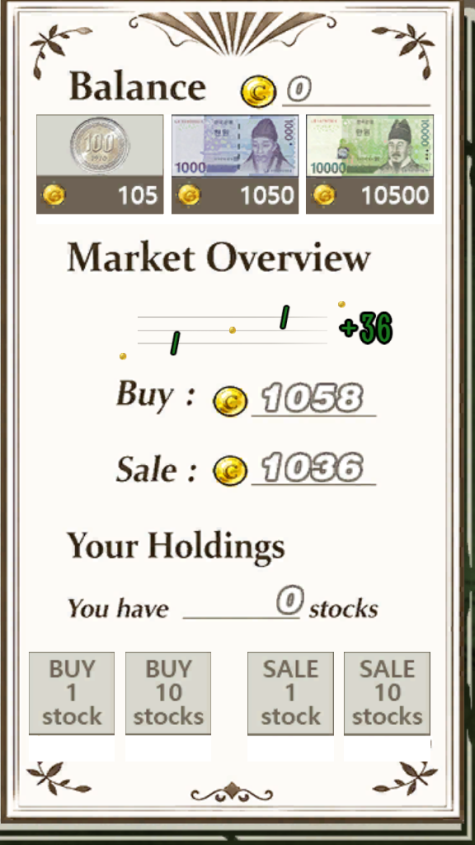
👉 Based on the DSA server stock system.
📊 Market Structure (Core)
More shop purchases -> Higher chance of price increase
More shop sales -> Higher chance of price decrease
👉 In other words, a player-driven market
Trading Methods
Buy 1 share
Buy 10 shares
Sell 1 share
Sell 10 shares
Price Changes
Player transactions are reflected in real time.
Prices fluctuate after each in-game day ends.
👉 Stocks are bound to the character like coins.
⚙️ Installed Mods
DSA Shop Mod
World Transfer Mod
Auto Reset
Upgrade Mod
MYHOME MOD
100 Stack Items
DONT DROP EVERYTHING MOD
Quick Pick
Remove Mimic
⚠️ Important Information
All worlds except World 1 are automatically managed.
Coins are not included in scheduled world resets.
📅 World Reset Schedule
Reset cycle: repeats every 3 months
Reset time: 01:10 – 01:30 (Korea Time)
Lobby and PvP worlds do not reset
🌱 1x Worlds
- World 11 → Jan / Apr / Jul / Oct 1
- World 12 → Jan / Apr / Jul / Oct 19
- World 13 → Feb / May / Aug / Nov 7
- World 14 → Feb / May / Aug / Nov 25
- World 15 → Mar / Jun / Sep / Dec 13
⚔️ 2x Worlds
- World 21 → Jan / Apr / Jul / Oct 4
- World 22 → Jan / Apr / Jul / Oct 22
- World 23 → Feb / May / Aug / Nov 10
- World 24 → Feb / May / Aug / Nov 28
- World 25 → Mar / Jun / Sep / Dec 16
🔥 3x Worlds
- World 31 → Jan / Apr / Jul / Oct 7
- World 32 → Jan / Apr / Jul / Oct 25
- World 33 → Feb / May / Aug / Nov 13
- World 34 → Mar / Jun / Sep / Dec 1
- World 35 → Mar / Jun / Sep / Dec 19
☠️ 4x Worlds
- World 41 → Jan / Apr / Jul / Oct 10
- World 42 → Jan / Apr / Jul / Oct 28
- World 43 → Feb / May / Aug / Nov 16
- World 44 → Mar / Jun / Sep / Dec 4
- World 45 → Mar / Jun / Sep / Dec 22
👹 5x Worlds
- World 51 → Jan / Apr / Jul / Oct 13
- World 52 → Feb / May / Aug / Nov 1
- World 53 → Feb / May / Aug / Nov 19
- World 54 → Mar / Jun / Sep / Dec 7
- World 55 → Mar / Jun / Sep / Dec 25
💀 6x Worlds
- World 61 → Jan / Apr / Jul / Oct 16
- World 62 → Feb / May / Aug / Nov 4
- World 63 → Feb / May / Aug / Nov 22
- World 64 → Mar / Jun / Sep / Dec 10
- World 65 → Mar / Jun / Sep / Dec 28
⚠️ Important Notice
Normally, the character itself is not deleted or reset.
Resets occur on the scheduled date for each world.
On reset day, if you are connected to the world being reset,
or if you last logged out in that world,
👉items and equipment in your inventory may be reset.
If you are located in another world, your character and items will remain unchanged.
🧠 Server Feature Summary
✔ 16-world multiworld structure
✔ Real-time economy system
✔ Stock Market System
✔ Upgrade system
✔ Multiple convenience mods applied
👉 Not just simple survival,
“Economy + Progression Server”
※ This post will continue to be updated as server updates and new content are added.